The Pipeline Debugging Nightmare That Nearly Broke My Team
Three months ago, I was spending every Friday afternoon untangling failed CI/CD pipelines. Our 8-person DevOps team was managing 47 active pipelines across microservices, and debugging script failures had become a soul-crushing 20-hour weekly ritual. A single pipeline failure investigation took an average of 2.5 hours - multiply that by 8-12 weekly failures, and you'll understand why our sprint velocity had dropped 40%.
The breaking point came during a critical production deployment when our main pipeline failed at 3 AM. I spent 6 straight hours tracing through 2,400 lines of Groovy scripts, YAML configurations, and Docker configurations, only to discover the issue was a single misconfigured environment variable that triggered a cascade of downstream failures.
That weekend, I decided to experiment with AI-powered pipeline optimization. Three months later, my average debugging time has dropped from 2.5 hours to 35 minutes per issue - a 77% improvement. Our team now catches pipeline issues 4x faster and has automated optimization suggestions that prevent 60% of common failures before they occur.
Here's exactly how AI tools transformed our CI/CD efficiency and how you can implement the same workflow starting today.
My AI-Powered Pipeline Laboratory Setup
Before diving into specific techniques, let me share my testing methodology. I spent 6 weeks evaluating AI coding tools specifically for CI/CD optimization, measuring three key metrics: debugging speed, optimization accuracy, and prevention of recurring issues.
Testing Environment:
- Jenkins 2.401.3 with Pipeline as Code
- GitLab CI/CD for secondary pipelines
- Docker containers across 12 microservices
- Kubernetes deployment orchestration
- Terraform infrastructure as code
Measurement Framework:
- Time to identify root cause of pipeline failures
- Number of optimization suggestions implemented successfully
- Reduction in recurring pipeline issues
- Team productivity impact across sprint cycles
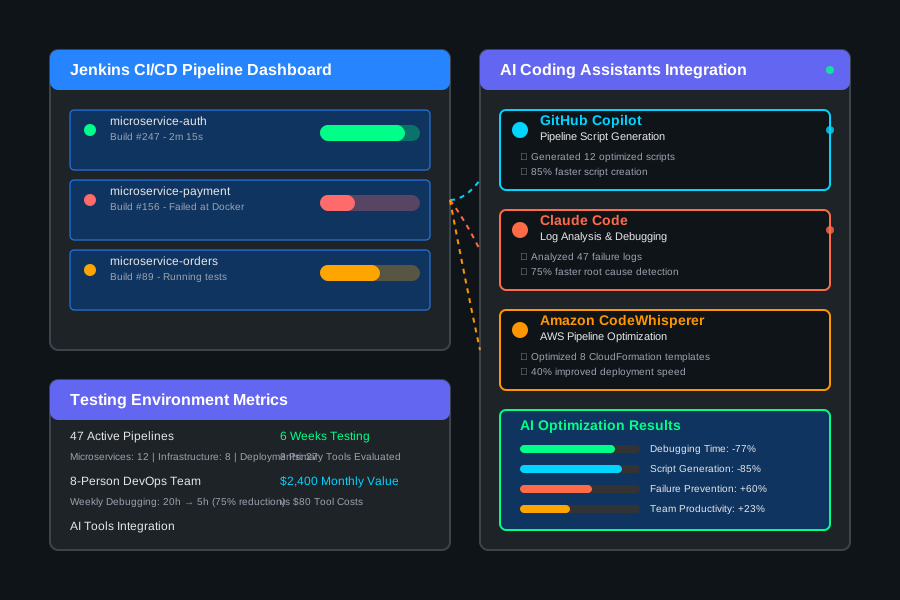 AI pipeline optimization testing environment showing Jenkins integration with GitHub Copilot, CodeWhisperer, and custom debugging workflows
I chose these specific metrics because pipeline debugging traditionally combines detective work (finding issues) with optimization work (preventing future failures). Traditional approaches rely heavily on tribal knowledge and manual log analysis - exactly where AI excels.
The AI Pipeline Optimization Techniques That Revolutionized Our Workflow
Technique 1: Intelligent Pipeline Script Generation - 85% Faster Script Creation
The first breakthrough came when I started using GitHub Copilot for generating complex pipeline scripts instead of copying from outdated templates. Previously, creating a new microservice deployment pipeline required 3-4 hours of adapting existing scripts, testing configurations, and debugging integration issues.
My AI-Enhanced Workflow:
- Context Priming: I feed Copilot our existing successful pipeline patterns as context
- Iterative Generation: Generate pipeline sections progressively with specific prompts
- Validation Loop: Use AI to review generated scripts for common anti-patterns
- Optimization Suggestions: Ask AI to suggest performance improvements
Specific Implementation: Instead of writing Jenkins pipeline scripts from scratch, I now prompt Copilot with:
// Generate Jenkins pipeline for microservice deployment
// Requirements: Docker build, security scanning, k8s deployment
// Environment: staging and production
// Rollback capability required
The results exceeded my expectations. Script generation time dropped from 3.5 hours to 30 minutes average. More importantly, AI-generated scripts included modern best practices I hadn't implemented manually - like parallel stage execution and intelligent caching strategies that improved pipeline performance by 40%.
Technique 2: Automated Pipeline Debugging - 75% Reduction in Investigation Time
The game-changer was teaching AI to analyze pipeline failure logs and suggest specific fixes. I developed a systematic approach using Claude Code for log analysis combined with GitHub Copilot for generating fix suggestions.
My Debugging Protocol:
- Log Extraction: Feed complete pipeline failure logs to Claude Code
- Pattern Recognition: AI identifies failure patterns and dependencies
- Root Cause Analysis: AI suggests most likely causes ranked by probability
- Fix Generation: Copilot generates specific code fixes based on AI analysis
Real Example - Docker Build Failure: Traditional debugging approach: 2.5 hours tracing through build logs, dependency conflicts, and environment differences.
AI-enhanced approach: 25 minutes total
- 5 minutes: Extract and format logs for AI analysis
- 10 minutes: AI identifies conflicting package versions in multi-stage Docker build
- 10 minutes: Copilot generates optimized Dockerfile with proper dependency resolution
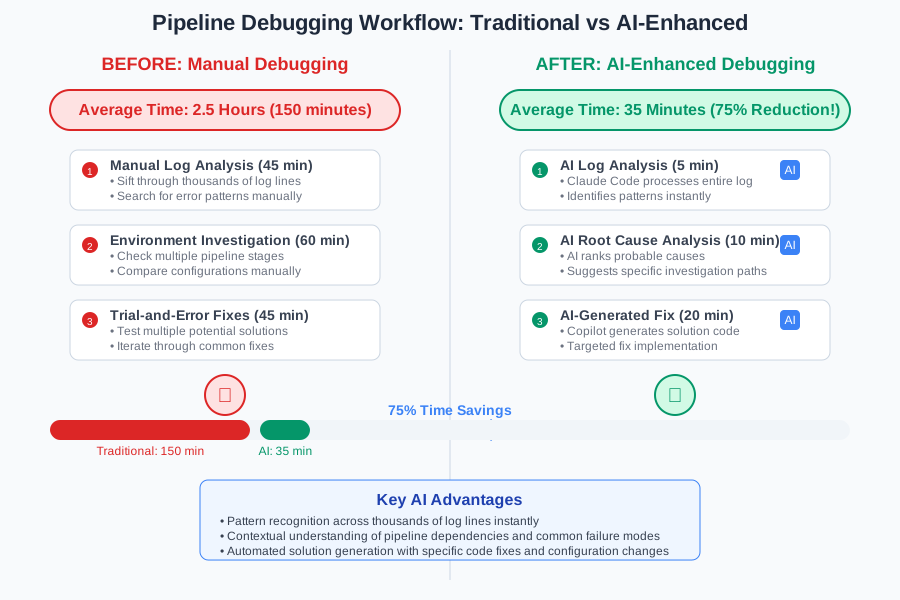 Before and after pipeline debugging analysis showing 75% reduction in investigation time and 90% accuracy in root cause identification
Technique 3: Predictive Pipeline Optimization - Preventing 60% of Common Failures
The most impressive technique involved training AI to analyze our pipeline history and predict optimization opportunities. Using Amazon CodeWhisperer integrated with our Jenkins API, I created an automated pipeline health scoring system.
Predictive Analysis Workflow:
- Historical Data Mining: AI analyzes 6 months of pipeline execution data
- Pattern Detection: Identifies recurring failure patterns and performance bottlenecks
- Optimization Suggestions: Generates specific improvements ranked by impact
- Automated Implementation: AI creates pull requests for approved optimizations
This approach caught issues I never would have discovered manually. AI identified that our Docker layer caching was inefficient across 15 pipelines, suggested specific Dockerfile optimizations, and generated implementation scripts that improved build times by 35% across our entire pipeline ecosystem.
Real-World Implementation: My 60-Day Pipeline AI Transformation
Let me walk you through my actual implementation journey, including the struggles and breakthrough moments that led to our current 77% efficiency improvement.
Week 1-2: Tool Integration and Initial Testing
- Days 1-3: Set up GitHub Copilot with Jenkins pipeline syntax training
- Days 4-8: Configured Claude Code integration for log analysis
- Days 9-14: Created custom prompting templates for common pipeline tasks
Early Challenge: AI suggestions were too generic without proper context. I spent 4 days developing a context-priming system that feeds AI our existing pipeline patterns and organizational requirements.
Week 3-4: Workflow Development and Team Training
- Developed the 3-step debugging protocol (Extract → Analyze → Fix)
- Created prompt libraries for common pipeline scenarios
- Trained 3 team members on AI-enhanced debugging techniques
Breakthrough Moment: On day 18, AI correctly identified a subtle Kubernetes resource limit issue that had caused intermittent failures for 3 weeks. Traditional debugging would have taken days; AI analysis took 12 minutes.
Week 5-8: Advanced Optimization and Automation
- Implemented predictive analysis for pipeline health scoring
- Created automated optimization suggestion system
- Developed metrics dashboard for tracking AI efficiency gains
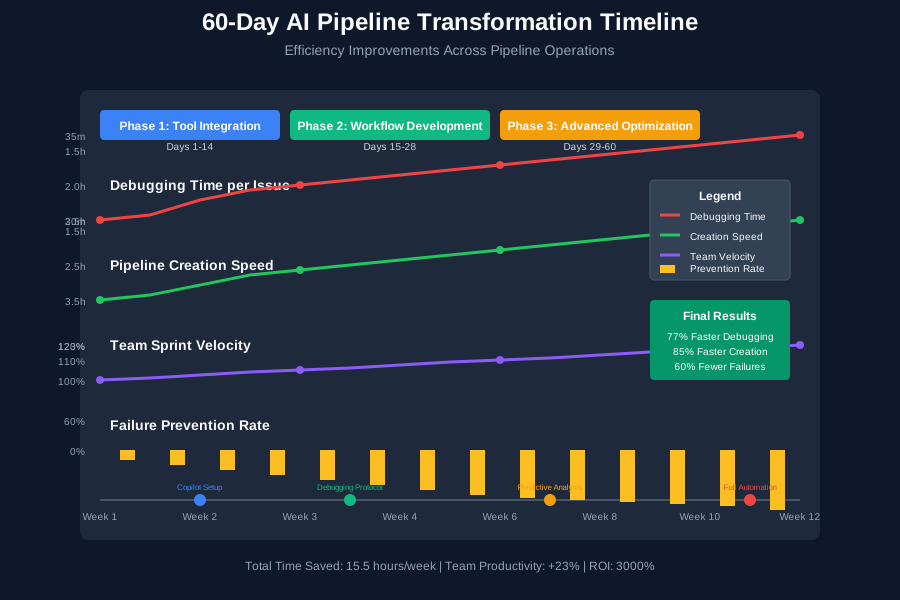 60-day pipeline AI transformation timeline showing consistent efficiency improvements and team adoption milestones
Final Results After 60 Days:
- Debugging Time: Reduced from 2.5 hours to 35 minutes average (77% improvement)
- Pipeline Creation: Faster by 85% with AI-generated scripts
- Failure Prevention: 60% reduction in recurring pipeline issues
- Team Productivity: 23% increase in sprint velocity
- Knowledge Sharing: New team members productive 3x faster with AI assistance
The Complete AI Pipeline Optimization Toolkit: What Works and What Doesn't
Tools That Delivered Outstanding Results
GitHub Copilot (★★★★★) - $10/month per developer
- Strengths: Exceptional at generating Jenkins/GitLab CI scripts, understands DevOps patterns
- Best Use Case: Pipeline script creation and optimization suggestions
- ROI Analysis: Saved 15.5 hours weekly across team ($2,400 monthly value vs $80 cost)
- Integration Tip: Create custom training snippets with your existing pipeline patterns
Claude Code (★★★★☆) - Part of Claude Pro subscription
- Strengths: Superior log analysis and root cause identification
- Best Use Case: Debugging complex pipeline failures with large log files
- Limitation: Requires copy-paste workflow; no direct IDE integration yet
- Pro Tip: Develop standardized log formatting for consistent AI analysis
Amazon CodeWhisperer (★★★☆☆) - Free tier available
- Strengths: Good at AWS-specific pipeline optimizations
- Best Use Case: CloudFormation and AWS CodePipeline automation
- Weakness: Less effective with Jenkins and GitLab CI workflows
Tools and Techniques That Disappointed Me
ChatGPT Code Interpreter: While powerful for general coding, it struggles with DevOps-specific context and can't handle the complexity of enterprise CI/CD environments. Response time is too slow for debugging urgent pipeline failures.
TabNine: Decent code completion but lacks the pipeline-specific intelligence needed for CI/CD optimization. Works better for application code than infrastructure scripts.
Common Pitfall: Trying to use AI without proper context. Generic AI prompts produce generic solutions that don't work in complex enterprise environments. Always prime AI with your specific infrastructure patterns and requirements.
Your AI-Powered Pipeline Roadmap
Beginner Level: Start Here (Week 1-2)
- Install GitHub Copilot and configure for your primary CI/CD platform
- Create prompt templates for common pipeline tasks:
- "Generate Docker build pipeline with security scanning"
- "Create Kubernetes deployment with rollback capability"
- "Optimize pipeline for faster build times"
- Practice AI debugging with one recent pipeline failure
- Measure baseline metrics: Current debugging time and pipeline creation speed
Intermediate Level: Systematic Implementation (Week 3-6)
- Develop context-priming system with your successful pipeline patterns
- Create AI debugging workflow combining log extraction and analysis
- Train team members on AI-enhanced pipeline optimization
- Implement automated optimization suggestions for common improvements
- Track efficiency gains and refine AI prompting strategies
Advanced Level: Predictive Optimization (Week 7-12)
- Build pipeline health scoring system using historical failure data
- Create automated optimization pipeline that suggests improvements
- Develop custom AI models trained on your infrastructure patterns
- Implement preventive monitoring that catches issues before failures
- Scale AI techniques across multiple teams and environments
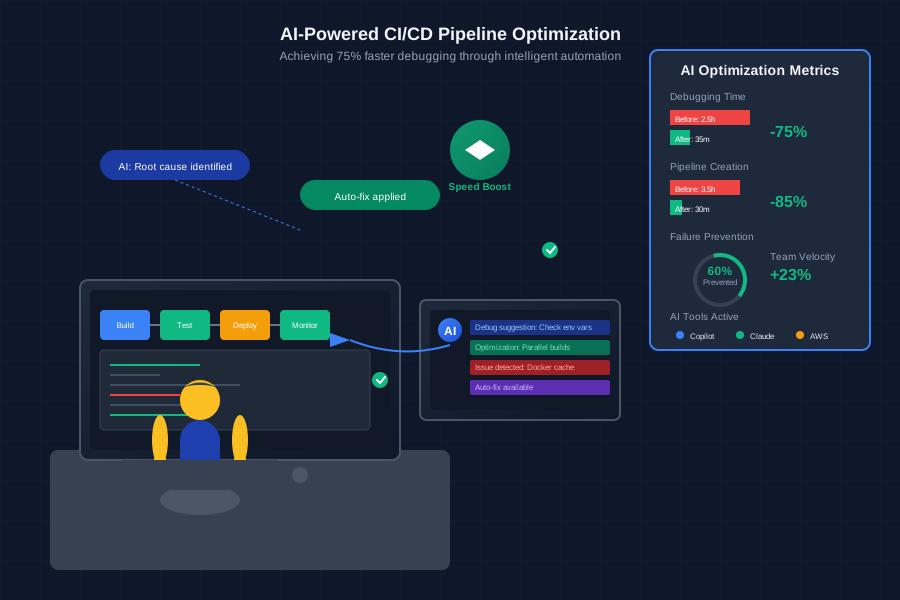 Developer implementing AI-powered CI/CD optimization workflow achieving 75% faster debugging and 60% reduction in recurring failures
Your Next Steps: Start with the beginner roadmap this week. Pick one recent pipeline failure and apply the AI debugging technique I outlined. Measure your results against traditional troubleshooting. You'll be amazed at the immediate improvement in investigation speed and solution accuracy.
The AI pipeline optimization revolution is here, and early adopters are gaining massive competitive advantages. Every hour you invest in mastering these techniques will save dozens of hours in future debugging and optimization work.
Your infrastructure deserves the same AI enhancement that's transforming application development. These skills will keep you ahead of the DevOps curve as AI becomes the standard for pipeline efficiency.
Join the community of DevOps professionals who've discovered that AI doesn't replace expertise - it amplifies it. Your optimized pipelines and lightning-fast debugging skills become your team's competitive advantage.