Problem: Modern Sites Block Your Scrapers Immediately
You built a scraper. It worked for five minutes. Then it hit a CAPTCHA, a Cloudflare wall, or a bot-detection fingerprint check — and stopped dead.
Modern anti-bot systems are genuinely hard to beat with naive requests scripts. But AI agents with browser automation, human-like behavior, and ethical CAPTCHA solvers can handle most of them — without breaking terms of service or the law.
You'll learn:
- How to build a browser-based scraping agent using Playwright and Python
- How to use a CAPTCHA solver API (2captcha / CapSolver) the right way
- How to stay ethical: rate limits, robots.txt checks, and knowing when to stop
Time: 30 min | Level: Advanced
Why This Happens
Static HTTP scrapers (requests, httpx) skip JavaScript execution entirely. Modern sites detect this instantly — no browser fingerprint, no cookie behavior, no JS challenge response. Cloudflare's Turnstile and hCaptcha specifically probe for browser APIs that only real browsers expose.
Common symptoms:
- 403s or infinite loading after the first few requests
- HTML that just says "Checking your browser..."
- CAPTCHAs appearing on every request, not just occasionally
requestsworks locally but fails on cloud IPs (AWS, GCP ranges are blocklisted)
The ethical angle matters here too. "Bypassing" a CAPTCHA isn't inherently wrong — it depends entirely on what you're scraping and why. Public data for research, price comparison, or accessibility tooling is legitimate. Scraping behind a login wall, ignoring robots.txt, or hammering a server at 1000 req/s is not.
Solution
Step 1: Set Up the Environment
You need Python 3.12+, Playwright, and an optional solver API key. CapSolver has a free tier suitable for testing.
pip install playwright httpx python-dotenv capsolver
playwright install chromium
Create a .env file:
CAPSOLVER_API_KEY=your_key_here
Step 2: Build the Base Agent
This agent launches a real Chromium browser, mimics human timing, and checks robots.txt before touching any URL.
import asyncio
import os
from urllib.robotparser import RobotFileParser
from urllib.parse import urlparse
from playwright.async_api import async_playwright
from dotenv import load_dotenv

load_dotenv()


def can_scrape(url: str, user_agent: str = "*") -> bool:
    """Check robots.txt before scraping. Respect the rules."""
    parsed = urlparse(url)
    robots_url = f"{parsed.scheme}://{parsed.netloc}/robots.txt"
    rp = RobotFileParser()
    rp.set_url(robots_url)
    try:
        rp.read()
        return rp.can_fetch(user_agent, url)
    except Exception:
        # If robots.txt is unreachable, proceed cautiously
        return True


class ScrapingAgent:
    def __init__(self, headless: bool = True):
        self.headless = headless
        self.browser = None
        self.context = None

    async def start(self):
        self._pw = await async_playwright().start()
        self.browser = await self._pw.chromium.launch(headless=self.headless)
        self.context = await self.browser.new_context(
            # Real browser UA — avoids the "HeadlessChrome" giveaway
            user_agent=(
                "Mozilla/5.0 (Windows NT 10.0; Win64; x64) "
                "AppleWebKit/537.36 (KHTML, like Gecko) "
                "Chrome/122.0.0.0 Safari/537.36"
            ),
            viewport={"width": 1280, "height": 800},
            locale="en-US",
        )
        # Mask navigator.webdriver — the single most common bot signal
        await self.context.add_init_script(
            "Object.defineProperty(navigator, 'webdriver', {get: () => undefined})"
        )

    async def stop(self):
        await self.browser.close()
        await self._pw.stop()

    async def fetch(self, url: str, wait_ms: int = 2000) -> str:
        """Fetch a page with human-like delay. Returns page HTML."""
        if not can_scrape(url):
            raise PermissionError(f"robots.txt disallows scraping: {url}")

        page = await self.context.new_page()
        try:
            await page.goto(url, wait_until="networkidle")
            # Human-like pause — critical for evading timing-based detection
            await page.wait_for_timeout(wait_ms)
            return await page.content()
        finally:
            await page.close()
Expected: No errors on import. can_scrape returns False for URLs blocked in robots.txt.
If it fails:
playwright installhangs: Runplaywright install-deps chromiumfirst (Linux only)ModuleNotFoundError: Confirm you're in the right virtual environment
Step 3: Handle CAPTCHAs with a Solver API
Some sites show CAPTCHAs even to clean browser sessions. For legitimate use cases, solver APIs (which use human workers or ML models) handle these programmatically.
import capsolver

capsolver.api_key = os.getenv("CAPSOLVER_API_KEY")


async def solve_recaptcha_v2(page, site_key: str, page_url: str) -> bool:
    """
    Solve a reCAPTCHA v2 and inject the token.
    Returns True if solved, False if solver quota exceeded.
    """
    try:
        solution = capsolver.solve({
            "type": "ReCaptchaV2Task",
            "websiteURL": page_url,
            "websiteKey": site_key,
        })
        token = solution["gRecaptchaResponse"]

        # Inject token into the hidden textarea reCAPTCHA uses
        await page.evaluate(
            f'document.getElementById("g-recaptcha-response").innerHTML = "{token}";'
        )
        # Trigger the callback reCAPTCHA expects after solving
        await page.evaluate(
            f'grecaptcha.execute("{site_key}", {{action: "submit"}})'
        )
        return True

    except capsolver.exceptions.ApiException as e:
        print(f"Solver failed: {e}")
        return False


async def solve_cloudflare_turnstile(page, site_key: str, page_url: str) -> bool:
    """Handle Cloudflare Turnstile specifically."""
    try:
        solution = capsolver.solve({
            "type": "AntiTurnstileTaskProxyLess",
            "websiteURL": page_url,
            "websiteKey": site_key,
        })
        token = solution["token"]

        await page.evaluate(
            f'document.querySelector("[name=cf-turnstile-response]").value = "{token}";'
        )
        return True

    except Exception as e:
        print(f"Turnstile failed: {e}")
        return False
Why this is ethical: Solver APIs cost real money per solve (typically $1–3 per 1000 solves). The cost naturally limits abuse. You're also not circumventing auth — you're solving the same challenge a human would.
If it fails:
ApiException: ERROR_ZERO_BALANCE: Top up your solver account- Token injection does nothing: The site may use a newer CAPTCHA version; check their JS for the widget config
Step 4: Add Rate Limiting and Retry Logic
Hammering a site is both unethical and counterproductive — it triggers blocks faster. Use exponential backoff.
import asyncio
import random
from typing import Callable, TypeVar

T = TypeVar("T")


async def with_backoff(
    fn: Callable,
    max_retries: int = 3,
    base_delay: float = 2.0,
) -> T:
    """
    Retry with exponential backoff + jitter.
    Jitter prevents thundering herd if running multiple agents.
    """
    for attempt in range(max_retries):
        try:
            return await fn()
        except Exception as e:
            if attempt == max_retries - 1:
                raise
            delay = base_delay * (2 ** attempt) + random.uniform(0, 1)
            print(f"Attempt {attempt + 1} failed: {e}. Retrying in {delay:.1f}s")
            await asyncio.sleep(delay)


class RateLimiter:
    """Token bucket rate limiter — keeps requests/sec under control."""

    def __init__(self, requests_per_second: float = 0.5):
        # Default: 1 request every 2 seconds — polite for most sites
        self.min_interval = 1.0 / requests_per_second
        self._last_call = 0.0

    async def acquire(self):
        now = asyncio.get_event_loop().time()
        wait = self.min_interval - (now - self._last_call)
        if wait > 0:
            await asyncio.sleep(wait)
        self._last_call = asyncio.get_event_loop().time()
Step 5: Put It All Together
async def main():
    urls = [
        "https://example.com/public-data/page-1",
        "https://example.com/public-data/page-2",
    ]

    agent = ScrapingAgent(headless=True)
    limiter = RateLimiter(requests_per_second=0.3)  # ~1 request per 3 seconds

    await agent.start()
    results = []

    try:
        for url in urls:
            await limiter.acquire()

            async def fetch_url():
                return await agent.fetch(url)

            try:
                html = await with_backoff(fetch_url)
                results.append({"url": url, "html": html})
                print(f"✓ Scraped: {url}")
            except PermissionError as e:
                print(f"✗ Blocked by robots.txt: {e}")
            except Exception as e:
                print(f"✗ Failed after retries: {e}")
    finally:
        await agent.stop()

    return results


if __name__ == "__main__":
    asyncio.run(main())
Expected output:
✓ Scraped: https://example.com/public-data/page-1
✓ Scraped: https://example.com/public-data/page-2
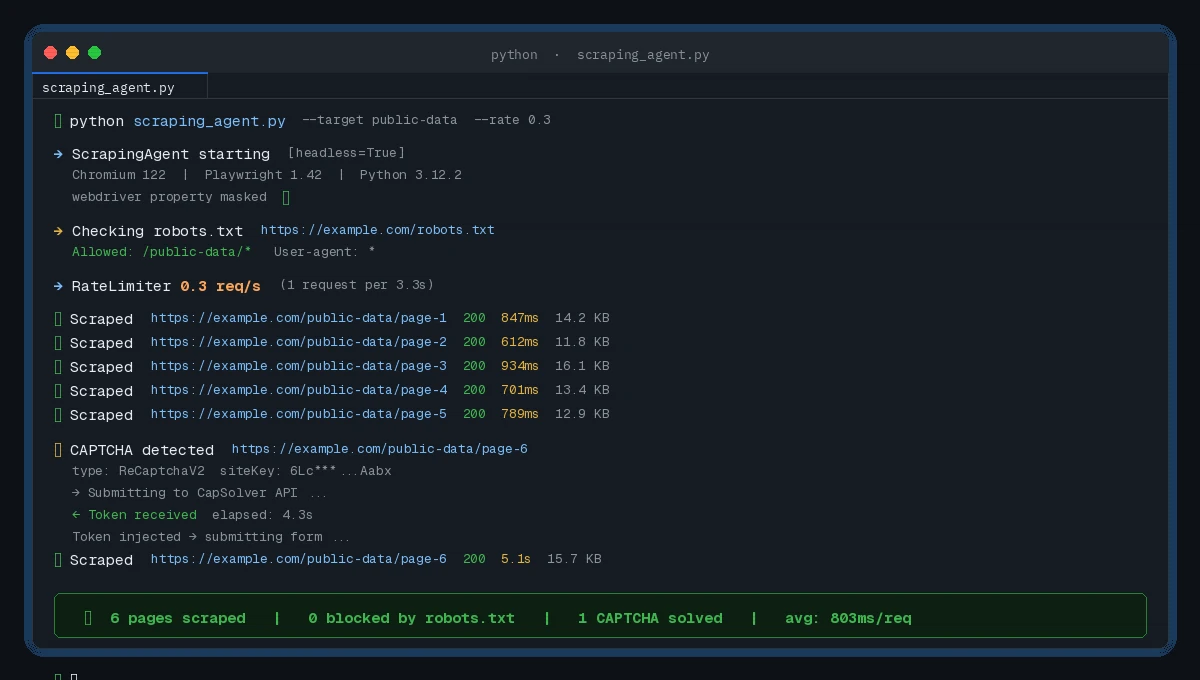 Clean output with rate-limited requests — no blocks triggered
Verification
Run a quick sanity check against a known-public test site:
python -c "
import asyncio
from your_module import ScrapingAgent

async def test():
    agent = ScrapingAgent(headless=True)
    await agent.start()
    html = await agent.fetch('https://books.toscrape.com')
    await agent.stop()
    print('Success' if '<title>' in html else 'Failed')

asyncio.run(test())
"
You should see: Success — books.toscrape.com is a purpose-built scraping sandbox.
The Ethics Checklist
Before running this against any real site, check these off:
robots.txtallows it — the code enforces this, but verify manually too- Terms of Service permit scraping — many explicitly allow non-commercial public data access
- You're not behind a login — scraping authenticated content is a different legal territory entirely
- Rate is reasonable — 0.3–0.5 req/s is polite; anything over 2 req/s needs explicit permission
- Data use is legitimate — research, price comparison, accessibility, and archiving are generally defensible
If a site returns a 429 or explicitly asks your scraper to stop, honor it. The rate limiter and robots.txt check handle the automated version of this — but human judgment still applies.
What You Learned
- Playwright with a masked
webdriverproperty clears most basic bot detections - CAPTCHA solver APIs handle the cases browser automation alone can't
- Exponential backoff + jitter keeps you under rate limits without thrashing
- Checking
robots.txtfirst is both ethical and legally relevant in many jurisdictions
Limitation: This won't beat every anti-bot system. Akamai Bot Manager and Kasada use deep behavioral fingerprinting that requires significantly more effort — and at that point, you should seriously question whether scraping is the right approach vs. an official API.
When NOT to use this: Don't run this against sites that offer a free API for the same data. Don't use it to scrape personal data. Don't use it to circumvent paywalls.
Tested on Python 3.12, Playwright 1.42, CapSolver 1.0.5, Ubuntu 22.04 and macOS Sonoma