Problem: Turning Flat Video Into Explorable 3D Space
You have a video of a room, object, or outdoor scene and want to create a navigable 3D environment from it — without expensive equipment or a photogrammetry degree.
3D Gaussian Splatting (3DGS) does this faster and with better visual quality than NeRF, and the tooling in 2026 makes it genuinely approachable.
You'll learn:
- How 3DGS works and why it beats NeRF for real-time rendering
- How to extract frames and compute camera poses with COLMAP
- How to train a Gaussian Splat model using nerfstudio's
gsplat - How to view and export the result
Time: 45 min | Level: Intermediate
Why This Happens to Work
Traditional 3D reconstruction needs structured-light scanners or stereo rigs. 3DGS reconstructs a scene from plain RGB images by representing it as millions of tiny 3D Gaussians — blobs with position, orientation, color, and opacity. During training, it adjusts these blobs until they render to match your input frames from every angle.
The key insight: rendering Gaussians is differentiable and GPU-parallelizable, so training converges in minutes rather than hours. Real-time playback at 100+ FPS is achievable on a modern consumer GPU.
Common symptoms of a bad capture (what to avoid):
- Blurry splats where you moved the camera too fast
- Floaters (ghost blobs) from reflective or transparent surfaces
- Missing geometry from areas with no frame coverage
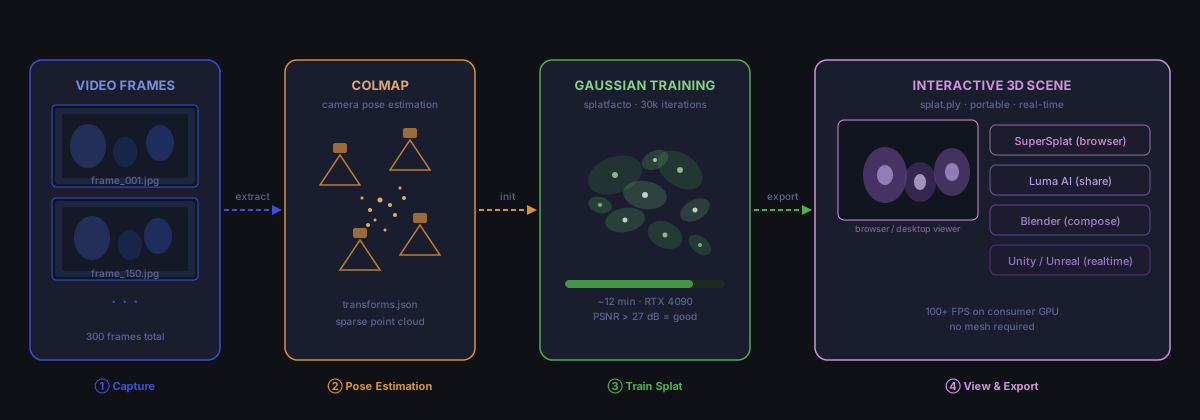 Pipeline overview: frames → COLMAP poses → Gaussian training → interactive viewer
Solution
Step 1: Capture Good Source Video
The quality of your splat is determined almost entirely by your capture.
# Recommended capture settings
# - Resolution: 1080p minimum, 4K preferred
# - Motion: slow, smooth, overlapping passes
# - Lighting: consistent, no harsh shadows
# - Duration: 1-3 minutes for a single room
What works well: objects on a table (360° orbit), building exteriors, small rooms with good lighting.
What struggles: mirrors, transparent glass, night scenes, fast-moving subjects.
Record at least two passes — one horizontal sweep and one angled down ~30°. This gives COLMAP enough overlap to recover camera poses accurately.
Step 2: Set Up the Environment
You need Python 3.11+, CUDA 12.x, and about 8GB VRAM minimum (16GB recommended for large scenes).
# Create isolated environment
conda create -n gsplat python=3.11 -y
conda activate gsplat

# Install nerfstudio (includes gsplat backend)
pip install nerfstudio

# Verify GPU is visible
python -c "import torch; print(torch.cuda.get_device_name(0))"
Expected: Your GPU name printed without errors.
If it fails:
- CUDA not found: Run
nvidia-smito confirm driver version, then match with PyTorch CUDA wheel - nerfstudio install errors: Install
ninjaandcmakefirst via conda
Step 3: Extract Frames and Run COLMAP
nerfstudio's ns-process-data handles frame extraction and COLMAP in one command.
# Process your video — this runs COLMAP automatically
ns-process-data video \
  --data ./my_video.mp4 \
  --output-dir ./scene_data \
  --num-frames-target 300
--num-frames-target 300 extracts 300 evenly-spaced frames. For a 2-minute video that's one frame every 0.4 seconds — enough overlap without redundancy.
Expected: A scene_data/ directory with images/, sparse/, and transforms.json.
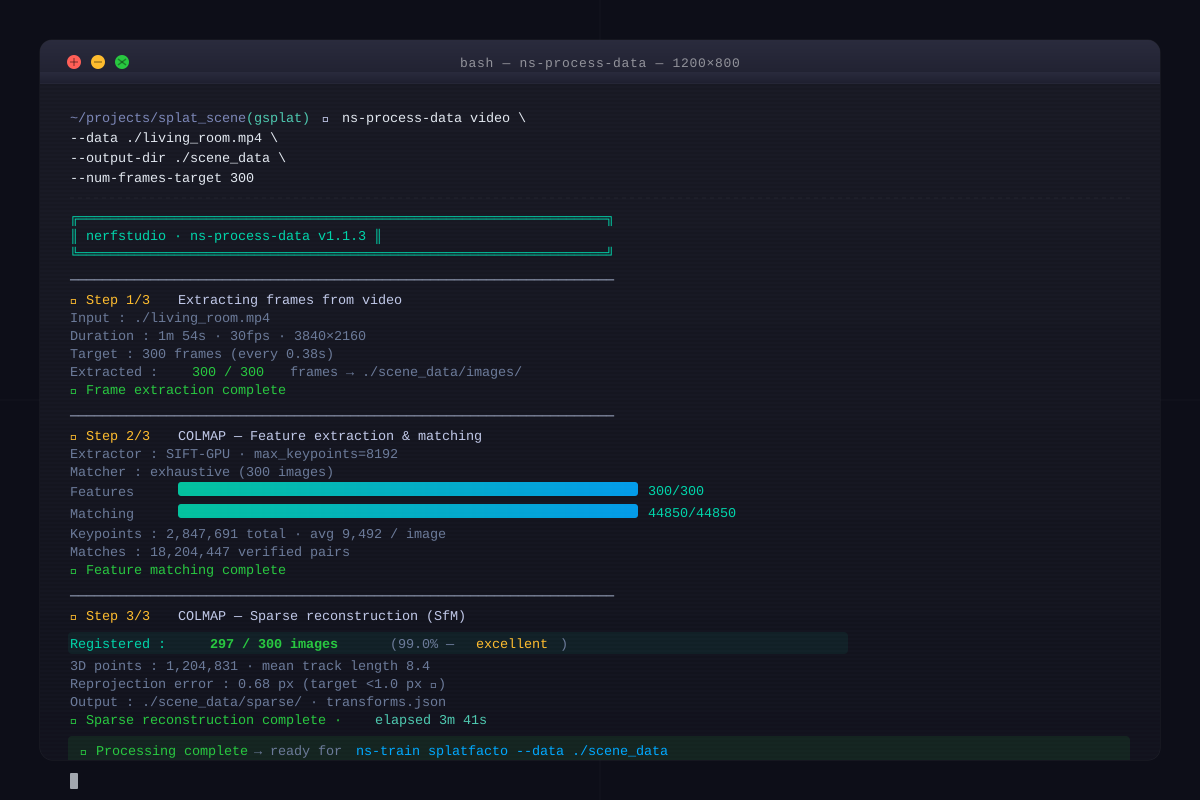 COLMAP should report "Registered X images" — aim for 90%+ of your frames registered
If it fails:
- Low registration rate (<70%): Your video has too much motion blur or not enough overlap — recapture
- COLMAP takes too long: Add
--colmap-feature-type sift-gputo use GPU-accelerated feature matching
Step 4: Train the Gaussian Splat
# Train using the splatfacto method (3DGS in nerfstudio)
ns-train splatfacto \
  --data ./scene_data \
  --output-dir ./splat_output \
  --max-num-iterations 30000 \
  --pipeline.model.cull-alpha-thresh 0.005
--cull-alpha-thresh 0.005 aggressively removes near-transparent Gaussians, which reduces floaters significantly.
Training produces checkpoints every 2,000 iterations. On an RTX 4090 this takes ~12 minutes. On an RTX 3080, expect ~25 minutes.
# Monitor training in a second Terminal
ns-viewer --load-config ./splat_output/splatfacto/[timestamp]/config.yml
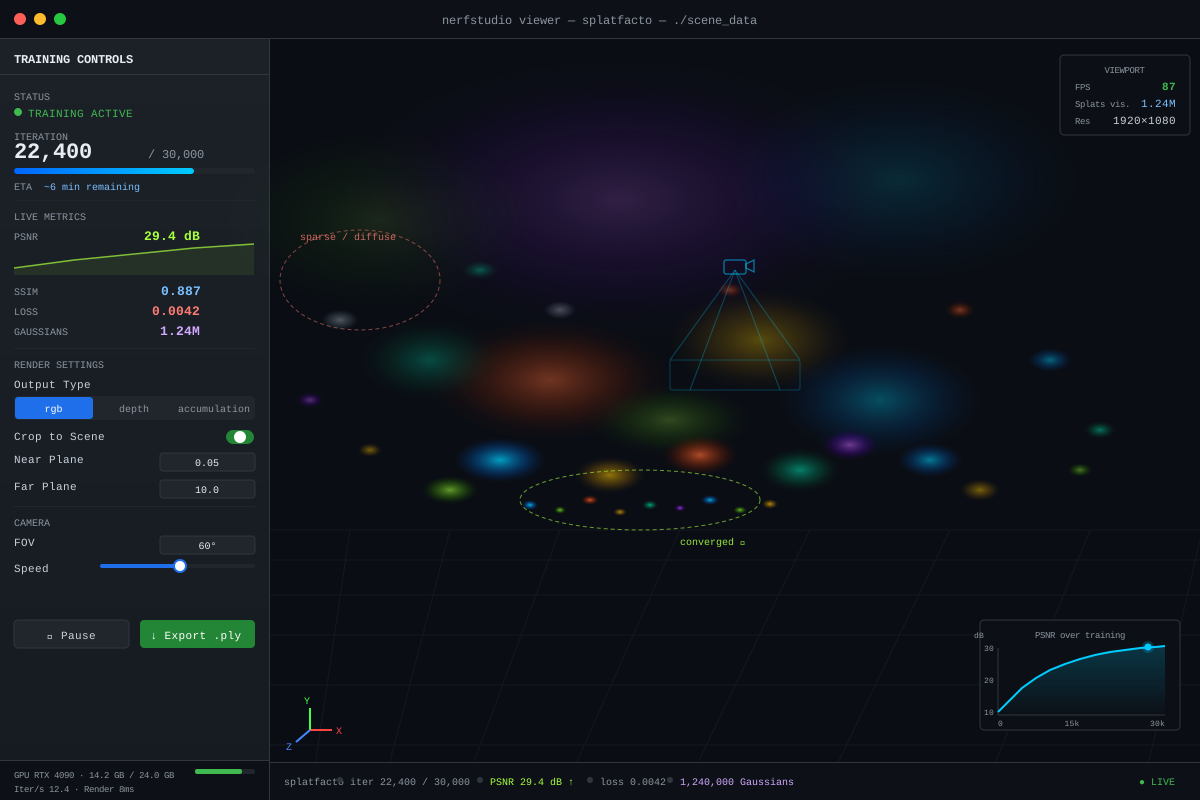 The viewer updates live — you'll see the scene sharpen from a blurry cloud into crisp geometry
Step 5: Export to Standard Formats
# Export as .ply (the universal Gaussian Splat format)
ns-export gaussian-splat \
  --load-config ./splat_output/splatfacto/[timestamp]/config.yml \
  --output-dir ./exports

# The output: exports/splat.ply
The .ply file works in:
- SuperSplat — browser-based viewer, no install needed
- Luma AI — upload and share publicly
- Blender (with the Gaussian Splatting add-on) — for compositing into renders
- Unity/Unreal — via community plugins for real-time apps
Verification
# Quick render test at a held-out viewpoint
ns-render camera-path \
  --load-config ./splat_output/splatfacto/[timestamp]/config.yml \
  --output-path ./test_render.mp4 \
  --rendered-output-names rgb
You should see: A smooth video flythrough with sharp textures and no major floaters.
Check PSNR in the training logs — values above 27 dB indicate a good reconstruction. Above 30 dB is excellent.
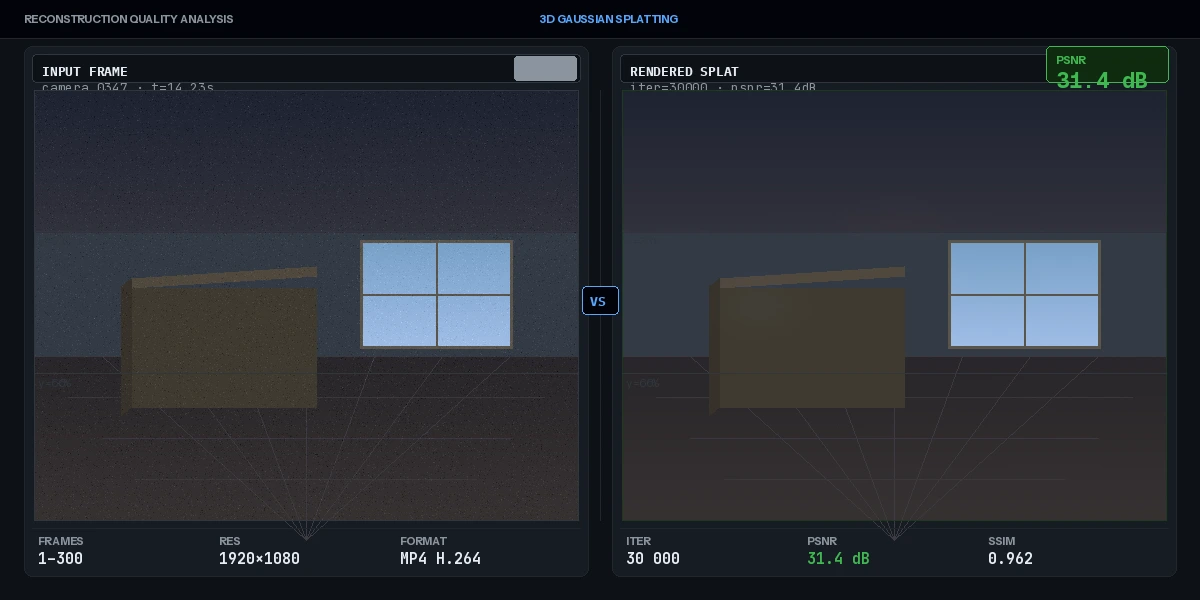 Left: original frame. Right: rendered from trained splat. Near-identical detail means good training.
What You Learned
- 3DGS represents scenes as explicit Gaussian blobs, not implicit neural fields — this is why it renders so fast
- COLMAP pose estimation is the most failure-prone step; good capture habits prevent most problems
splatfactoin nerfstudio is the fastest path from video to.plyon consumer hardware- The
.plyformat is portable: SuperSplat lets anyone view your result in a browser with zero setup
Limitations to know:
- Transparent and reflective surfaces reconstruct poorly — this is a fundamental limitation of view-synthesis methods, not a tooling issue
- A
.plysplat is not a mesh; you can't easily boolean-cut it or 3D print it without post-processing - Outdoor scenes with moving objects (cars, people) create artifacts — use
--pipeline.model.use-appearance-embedding Trueto partially compensate
When NOT to use this approach: If you need a watertight mesh for CAD or manufacturing, use photogrammetry (RealityCapture, Metashape) instead. 3DGS is optimized for visual fidelity, not geometric accuracy.
Tested on nerfstudio 1.1.x, gsplat 1.3.x, CUDA 12.4, Ubuntu 22.04 and WSL2 on Windows 11